Back to LITS
Add Participants (including TAs & Auditors)
Students registered in a course are automatically added by Moodle, but teaching assistants and mentors need to be added manually to the course.
To add a TA, auditor or additional faculty member to a course:
- Click the “Participants” link in the horizontal navigation menu under the course name in the top of your screen.

- On the next participants screen, Click the “Enrol users” button on the right.
- Set the role you want the student to have in the drop-down list next to “Assign roles” as follows:
- Teachers can do anything within a course, including changing the activities and grading students.
- Non-editing teachers can teach in courses and grade students, but may not alter activities.
- Non-grading TAs can do everything Teachers can do except view, modify or edit grade items.
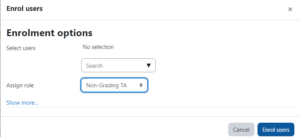
- Enter the individual’s name or email in the search field.
- When done, click Enrol users.
- The users you just added should now appear in the participant list.
