Log Into Your WordPress
After WordPress has been installed, you can log in to your site through Trinity Domains.
Option 1: Log in through Trinity Domains
- Go to domains.trincoll.edu.
- Log in with your regular Trinity username and password.
- In cPanel, find the Applications section.
- Click My Apps.
- Find your WordPress site.
- Click the login button.
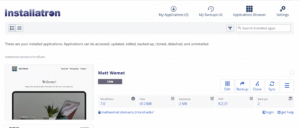
This will take you to the WordPress Dashboard, where you can edit pages, posts, media, menus, and other site content.
Option 2: Go directly to your WordPress login page
You can also try going directly to your WordPress admin page by adding /wp-admin to the end of your site address. Please note, for anyone other than the domain owner, this is the only option.
For example:
https://yourname.domains.trincoll.edu/wp-admin
For easy access, you can bookmark this link to your browser.
