Selecting the Home Page
Before you create your home page, it’s helpful to think about the purpose of your site and how you want visitors to interact with your content.
Creating your Home Page
Once you’ve chosen your preferred design, you can create your home page. WordPress will automatically display your blog posts on your home page. If you want to create a static homepage, you’ll have to adjust those settings.
To create a static home page, follow these steps:
- In the dashboard of your WordPress site, hover over “Settings” and then click “Reading “
- Under “Your homepage displays” select “A static page.”
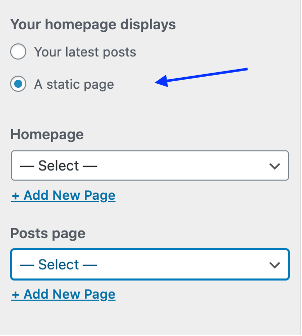
3. The drop down menu below allows you to select which page on your website you would like to serve as your static home page. If you have not yet created that page, you can select “Add New Page.”
4. The “Posts page” dropdown menu allows you designate which page on your site will host your posts. You click “Add New Page” to create a page for that as well.
5. Click “Publish” and then click the “x” to leave the customization screen.
6. To edit your pages, you can return to the dashboard and click “Pages.”
